Week 7
Notes: The information below is related to using Adobe Dreamweaver and MySQL databases. It is shown here for historical reasons, even though we are not using Dreamweaver.
- phpMyAdmin can perform any functions that you would need to do to your MySQL database.
- The Dreamweaver database Application wizards usually break once a person starts modifying the php code that the wizard created.
Connecting Dreamweaver to your MySQL database (compliments of Lavonne Hansen):
- Create administration users for your DB
- Go to yourwebsitename.info/cpanel and login.
- Go to Databases>MySQL databases and set up user
- Create the user e.g. admin ( note the user name is lastnfir_admin) Your account name prepends the username just created.
- Add user to the database
- Give full permissions
- Give permissions in RemoteMySQL to allow IP addresses to connect to the database
- Go to yourwebsitename.info/cpanel
- Go to Databases>RemoteMySQL
- Add access host ( use the % and click Add Host). This allows any IP address to connect to the database. Restrict this to just the IP address of your website for security reasons.
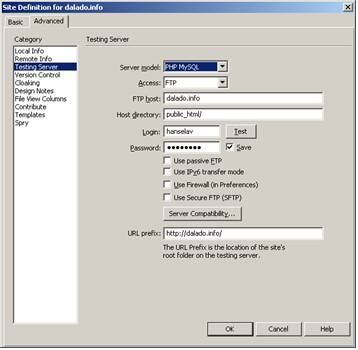
- Set up test server in Dreamweaver
- Go to Window>database to bring up the database window
- In the database window, click the Server behaviors tab
- Click on the “select site Testing server “ link
- Create the connection In Dreamweaver
- Database tab select the + sign (upper left) select MySQL connection
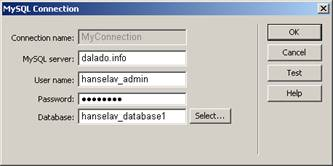
- The username and the database have the account name appended
Note the URL prefix at the bottom of this dialog box – take off the trailing public_html